
English
中文
Français
Español
العربية
Pусский
Deutsch
日本語
Português
हिन्दी
Getting Started
How to use Ipflare proxy
FAQ
Integrate Ipflare on iOS
Step 1: Download the proxy software Shadowrocket
Log in to App Store with a US Apple ID, search for 'shadow rocket' (commonly known as small rocket) to download and install.
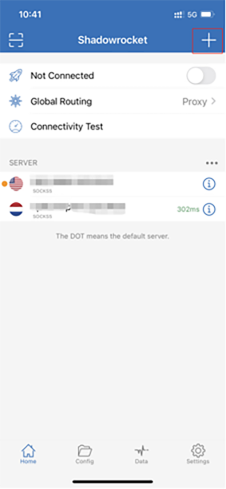
STEP 2: OPEN THE SMALL ROCKET
After opening the shadowlock, click the "+".
STEP 3: SELECT THE TYPE
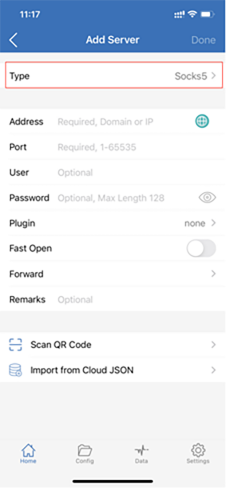
Select Socks5 or HTTP as the type.
STEP 4: FILL IN THE PROXY INFORMATION
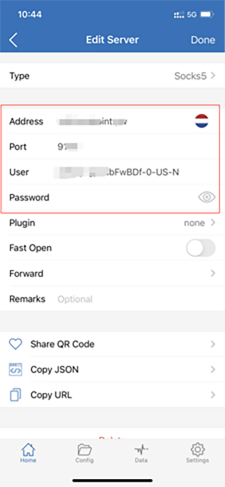
Fill in the server and user password. You can see these parameters in the list obtained through the Obtain proxy function on the console:
STEP 5: SELECT THE GLOBAL PATH FROM
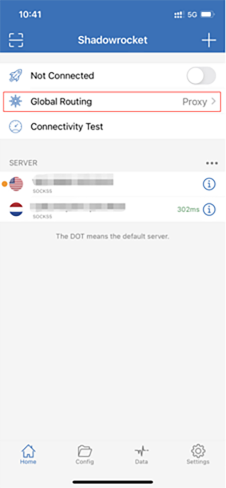
You will receive an iOS prompt, add Shadowrocket to the VPN configuration, and click Add.
STEP 6: OPEN THE PROXY AND TEST
Turn on the proxy switch button, and the configuration is complete.
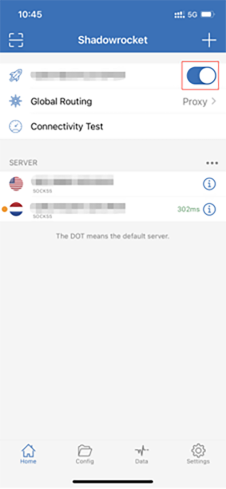
Use a browser to visit "http://ipinfo.io" to test if the proxy is working. Check if the public IP address has changed to confirm successful proxying.